
Executive Summary
Introduction
Marketing on social media is rarely about the writing. It is about the showing up — every day, at the right time, on the right Page, without getting stuck on an empty blank box. Generic scheduling tools will send your posts, but they will not tell you what to write, sound like you, or check whether a post is any good before it goes live. Belbotika Social does all of that.
Belbotika Social is the social marketing side of Belbotika (belbotika.com), an AI-powered marketing platform built in Ontario, Canada. Where Belbotika’s email and SMS side is built for industries, Belbotika Social is built for the daily job of keeping a business’s Facebook Pages active — and it connects straight to everything you already make in Belbotika. The weekly flyer you design for email becomes a week of posts. A published article becomes a social campaign in one step. Connect your own Page, sit down once, and Belbotika tells you what to post that week, writes it in your own voice, scores it before publishing, fix them if needed and puts it up on a schedule you approve — while you get on with running the business.
Free to start. No credit card needed.
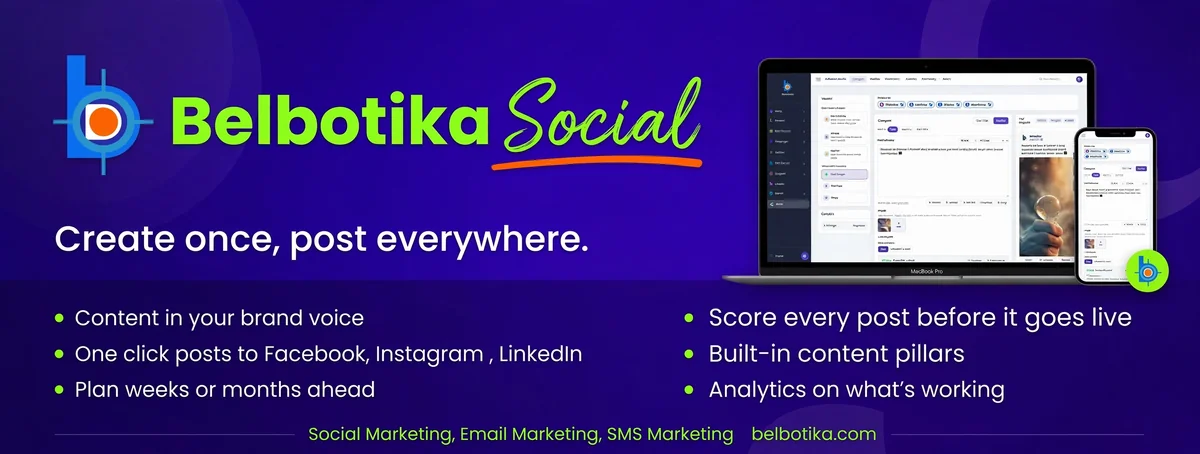
The Belbotika Social overview / connected accounts screen
The Problem With Posting on Social Media Manually
Most small businesses do not struggle to write one good post. They struggle with the routine:
- The daily scramble. Every morning, someone must decide what to post today — and too often, the answer is nothing.
- The expensive tools. Hootsuite and Buffer charge for every Page and every user, and they only send posts. They never tell you what to write.
- The generic tone. Scheduling tools have no idea how you talk to your customers. Their advice and their rewrites sound like a robot.
- The public mistakes. A typo, an all-caps post, a sales post buried between three more sales posts, a post sent at 3am — all of it goes to your followers before anyone notices.
- Meta Business Suite. Facebook’s own free tool can schedule posts. What it cannot do is write them, check them, Fix them, or plan them for you.
Belbotika Social solves the whole loop — planning, writing, checks, scheduling, publishing, and reviewing — not just the sending part.
The Belbotika Social overview / connected accounts screen
The Problem With Posting on Social Media Manually
Most small businesses do not struggle to write one good post. They struggle with the routine:
- The daily scramble. Every morning, someone must decide what to post today — and too often, the answer is nothing.
- The expensive tools. Hootsuite and Buffer charge for every Page and every user, and they only send posts. They never tell you what to write.
- The generic tone. Scheduling tools have no idea how you talk to your customers. Their advice and their rewrites sound like a robot.
- The public mistakes. A typo, an all-caps post, a sales post buried between three more sales posts, a post sent at 3am — all of it goes to your followers before anyone notices.
- Meta Business Suite. Facebook’s own free tool can schedule posts. What it cannot do is write them, check them, Fix them, or plan them for you.
Belbotika Social solves the whole loop — planning, writing, checks, scheduling, publishing, and reviewing — not just the sending part.
What Belbotika Social Is
Belbotika Social is a social publishing and content-planning suite for businesses that run their own Pages. It is built for any business whose customers live on Facebook — grocery stores, restaurants and cafes, clinics and dental practices, mosques and Islamic centres, real estate agents, schools, salons, and any local shop.
The core promise, in plain words: sit down once, write your week in your own words, approve, and your Pages keep posting on their own.
Getting Started with Belbotika Social
To begin streamlining your social media workflow, your first step is to visit belbotika.com using your preferred web browser. Once on the homepage, click on the Get Started button to set up your free account—no credit card is required to get started. Fill in your basic details, choose your password, and your workspace will be ready in under two minutes, giving you instant access to the platform's full suite of content planning and AI tools.
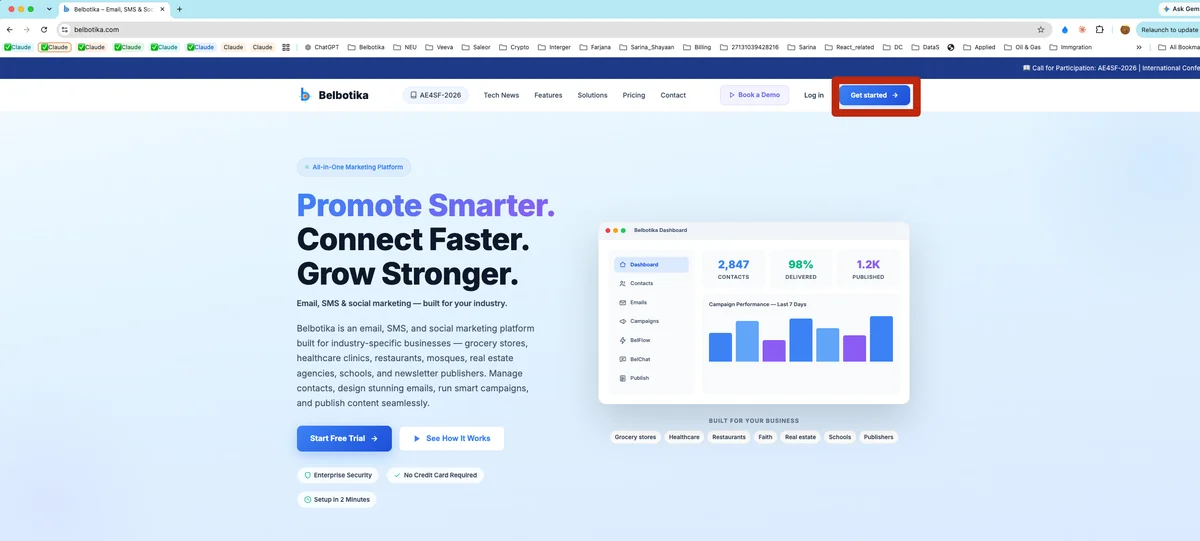
The Belbotika.com homepage featuring the main landing banner and the "Get Started" button highlighted
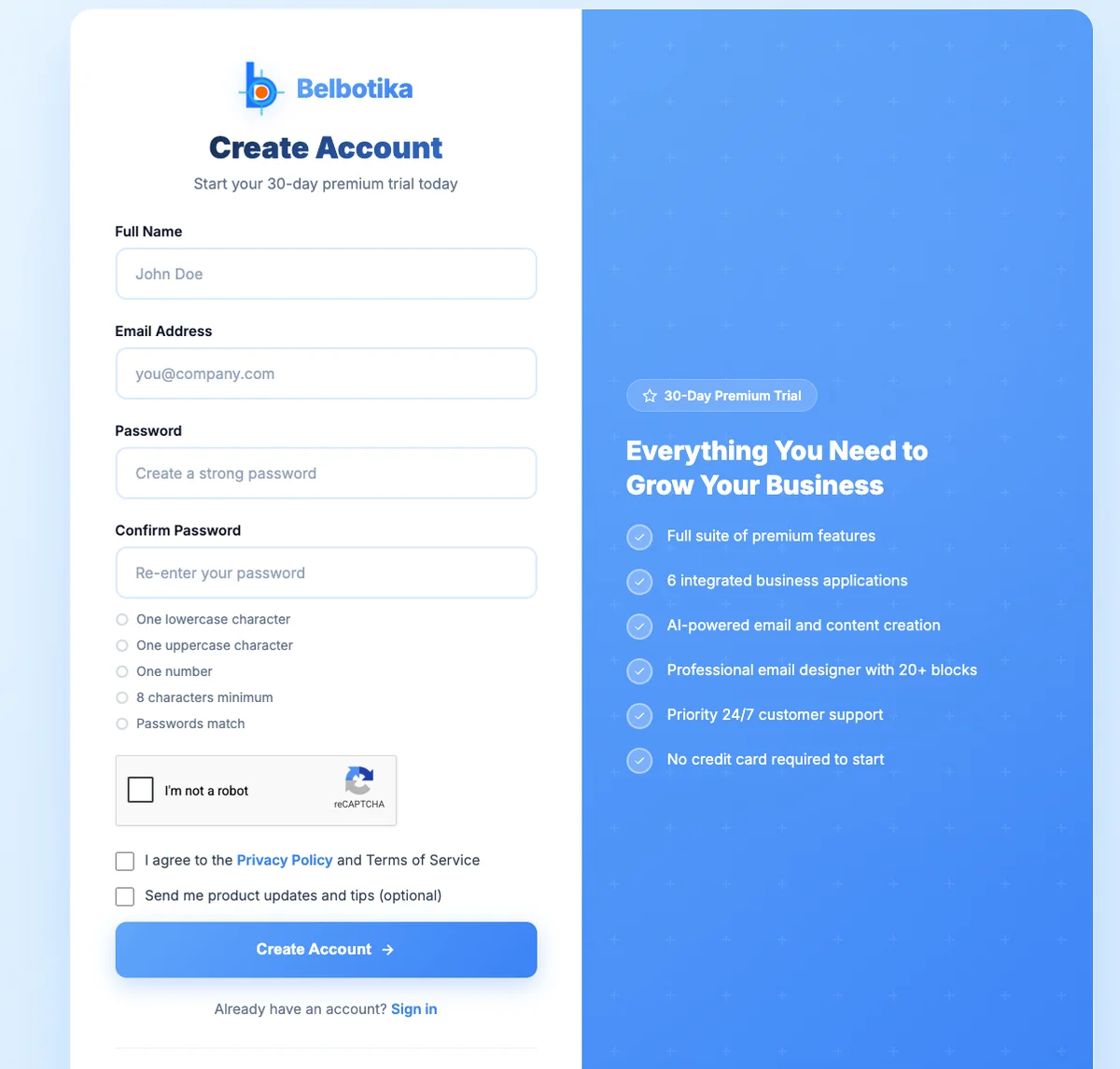
Belbotika Sign Up Form (No credit card needed and Free)
After creating your account, check your inbox to activate it—if you don't see the activation email right away, be sure to check your spam folder. Once your account is active, log in using your email and password. You will initially be prompted to complete your profile and business details. While this step is optional and can be skipped to personalize later, filling it out right away helps customize your workspace to your brand.
Next, the most important step is setting up your social connections. To connect your account, head to the top right corner of the dashboard
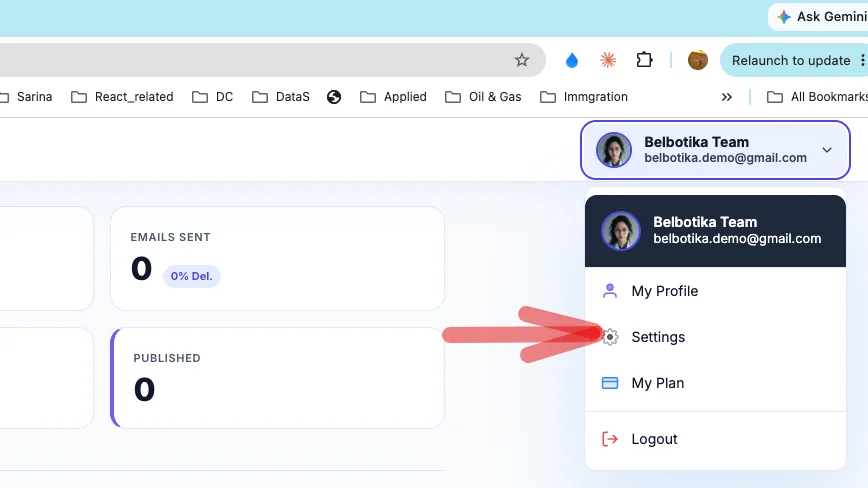
Entry of Setting to connect belbotika and social media (Facebook, Insgram and LinkedIn)
Connect Your Own Pages
It starts by connecting your own Facebook Page — one login, pick your Page, and you are connected in about two minutes. You can connect more than one Page to the same Belbotika workspace, which makes it natural for agencies, franchises, and business owners who run several outlets. Each Page is managed separately, and nothing is ever posted without your say-so.
Belbotika is built to spread the same post across your social accounts — the platform handles Facebook, Instagram, and LinkedIn in the same pipeline, with Facebook live and ready today and the other networks coming online as their connections are approved.
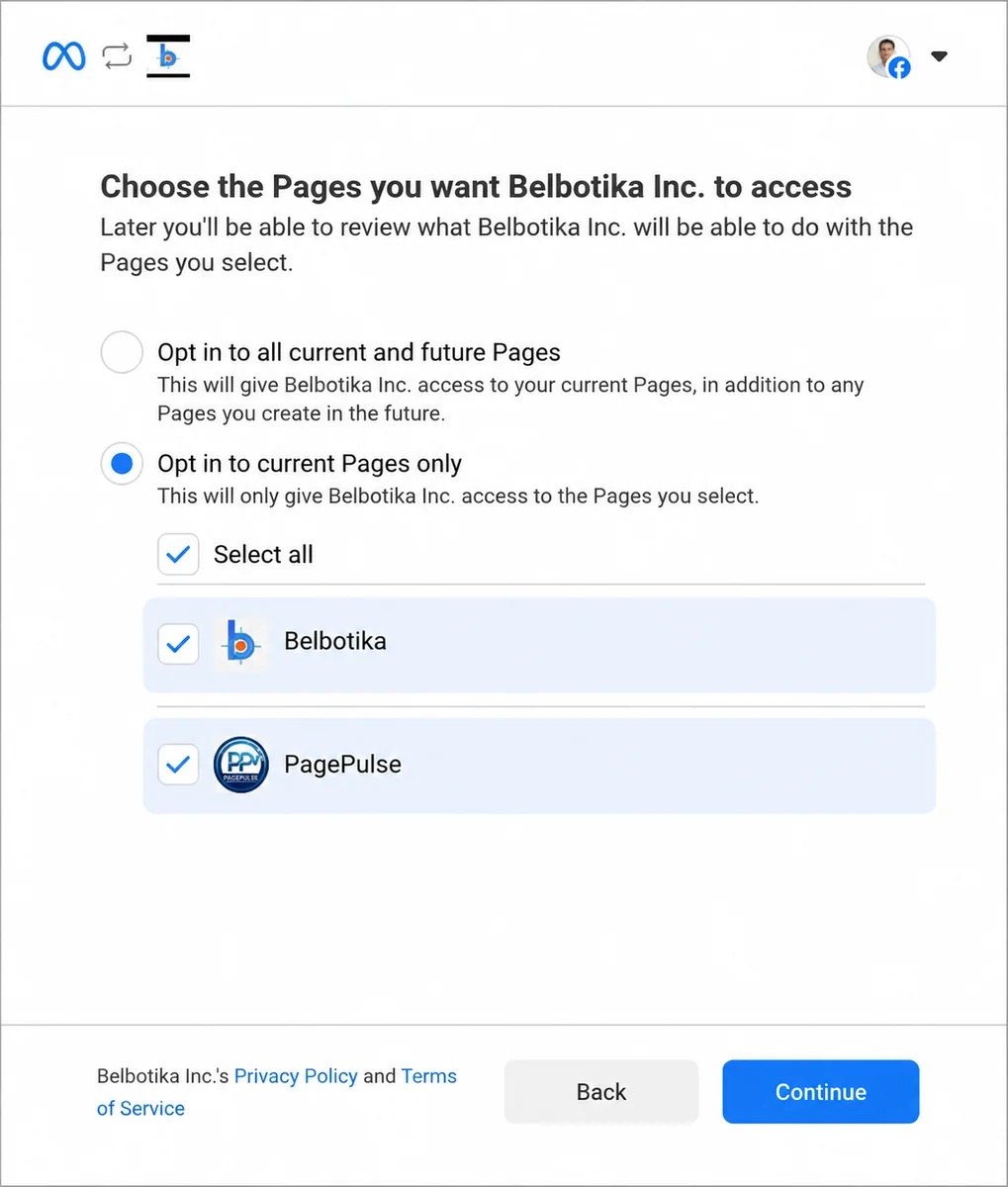
Connecting a Facebook Page / the Page picker
Key Features
The Studio — One Place to Compose Every Kind of Post
The Studio is where a post is born. In one screen you can write:
- A text post — your own words, or Belbotika’s help.
- A single photo post — upload, or pick from your library.
- A carousel — many photos in one scrollable post.
- A video post — including Reels.
- A link card — drop a URL and Belbotika pulls the preview picture, title and description for you, so the link looks good in the feed.
- A first comment — the caption that posts underneath your post, the standard way smart Pages add hashtags and links without cluttering the main text.
- UTM tagging — every link you share can carry campaign tags automatically, so you can see exactly where your clicks came from.
Drafts are saved automatically. Walk away halfway through your week, come back later, and your unfinished posts are exactly where you left them.
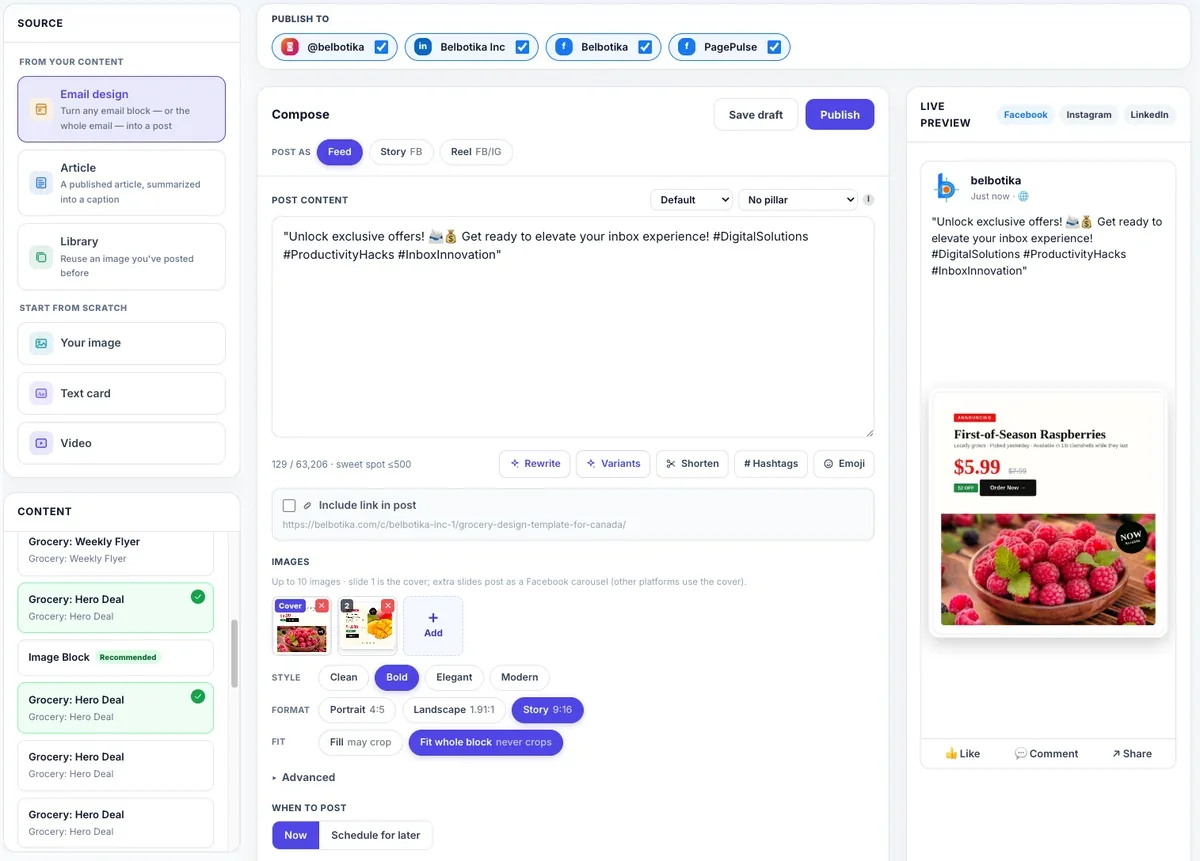
The Social Studio composer
Post From Any Source — One Thing Becomes a Whole Week
You never start from a blank box if you do not want to. Belbotika turns content you already have into posts:
- From email designs. Your weekly flyer, menu, or notice — once designed in Belbotika Email — becomes a week of social posts.
- From articles. Pick a published article, and Belbotika writes several distinct posts from it, each covering a different angle.
- From a URL. Give Belbotika a web link and it builds a post (or several) around that page, complete with its preview card.
- From the Planner. Let Belbotika suggest a full week of ideas first (see below), then fill them in one by one.
One thing in, many posts out — that is the point. You stop inventing five posts a week from nothing, and start turning one real piece of content into five chances to be seen.
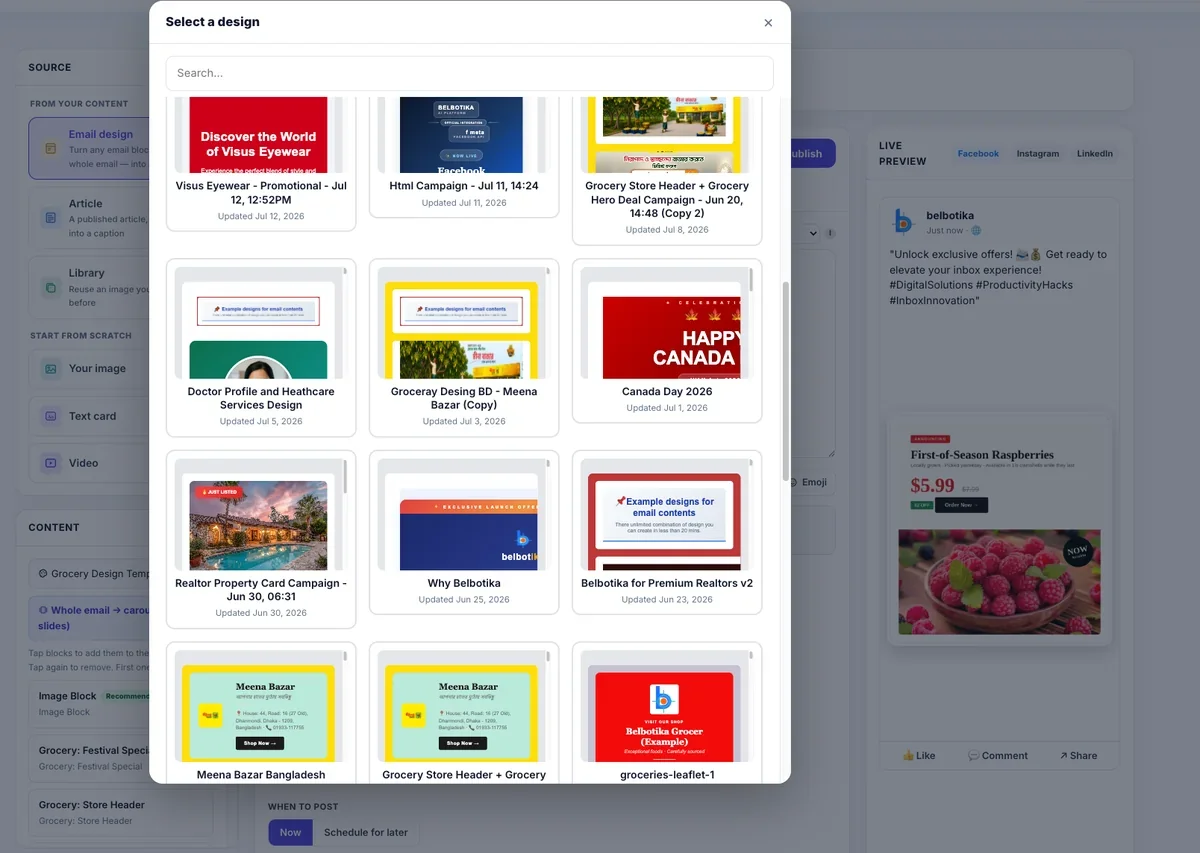
The source picker in the Studio — design, article, URL, upload, blank
From Your Email Design to a Week of Posts
This is the bridge Belbotika is built on. Whatever you design for email can become social posts with almost no extra work:
- Pick your design. The Studio lists every email design you have built in Belbotika Email — flyers, menus, notices, appointment reminders. Choose the one you want on social.
- Belbotika reads it for you. Each block inside the design is scored for how well it works as a social post — a hero banner, a product grid, a coupon, or a carousel scores high and is marked recommended; dividers and footers are left out. You never judge which piece of a flyer makes a good post alone.
- It becomes a ready-made image. The block you pick is turned into a social-sized image — in the right dimensions and shape for the feed, in several styles, one click at a time. No redesigning for social by hand.
- The caption writes itself. Belbotika reads the actual content of the block — the product, the price, the event, the offer — and writes a short, natural caption about that, in your brand voice, never mentioning emails or design blocks.
- It carries a shareable link. Every design gets its own clean public web link, which becomes the post’s link card — so the post on your Page points somewhere real.
- Schedule, approve, publish. It lands in your normal queue, exactly like every other post.
The flyer you designed for the inbox becomes the same week’s posts on your Page. One design session feeds both channels.
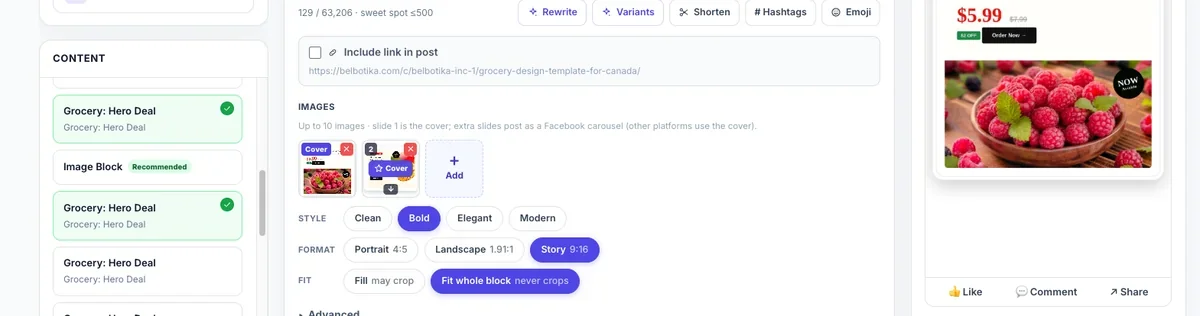
Choosing a block from an email design in the Studio
From Your Article to a Whole Campaign of Posts
Published an article, a blog post, or a newsletter on Belbotika’s publishing side? Turn it into a social campaign in one step:
- Pick the article. The article source shows your published pieces with their header image, summary, and author.
- Belbotika writes the angles. It reads the article and writes a set of distinct posts from it — 3, 5, or 7 — each covering a different insight so they never repeat each other, in the tone you choose: informative, engaging, or promotional.
- It attaches the goods. Each post brings the article’s image and its link card with it, ready to drive clicks back to the full piece.
- The whole set lands as one campaign. The posts arrive grouped, coloured on your calendar, and scheduled together — so one article becomes a reliable week of posts without you writing a single caption.
No more looking at a finished article and thinking “I should post about this” — then not having time. It is already a campaign.
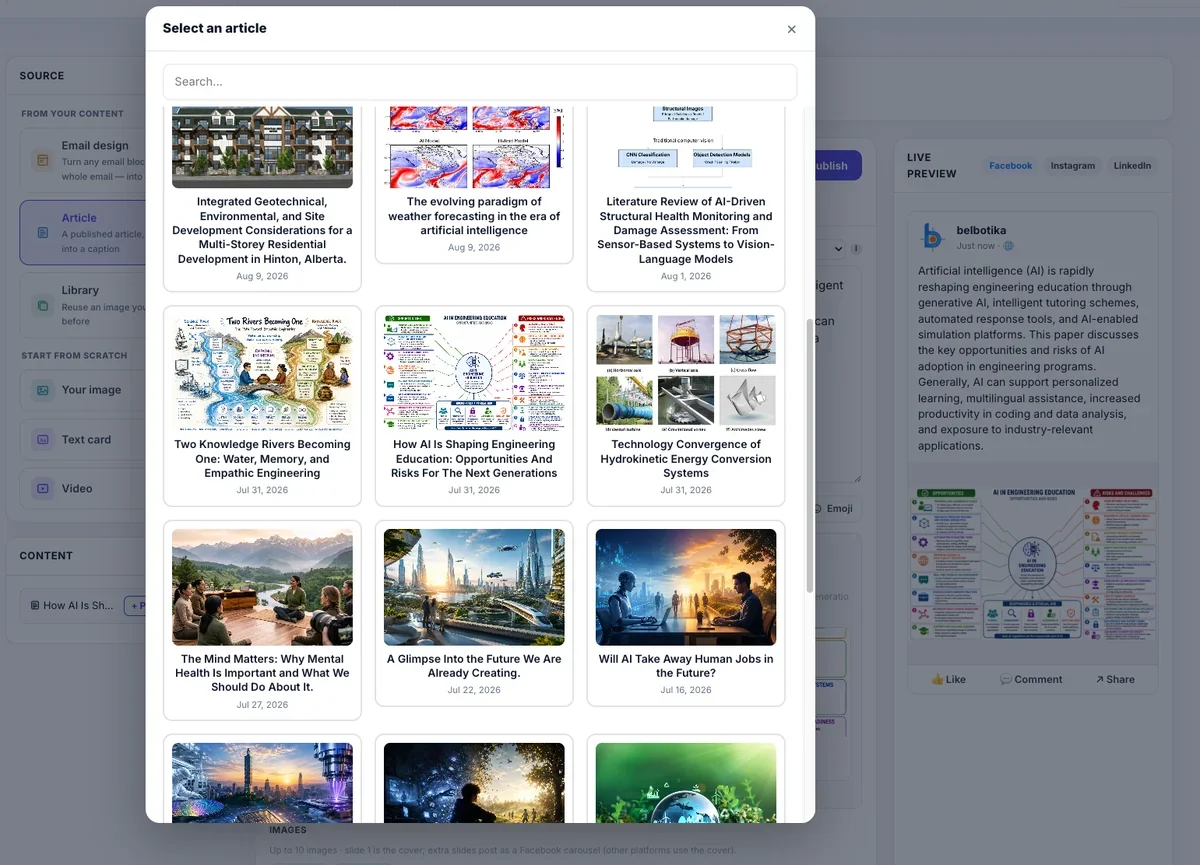
The article-to-posts flow, showing a generated set of drafts
It Writes in Your Own Words
Every word Belbotika writes is conditioned on your brand voice — not a generic tone. You set it once:
- Tone — friendly, professional, playful, bold, or warm.
- Emoji — from none to generous.
- Language — English, Bangla, or your own.
- Hashtags — the ones that belong to you.
- Words to never use — terms that are not you, kept out automatically.
- Who your customers are — their problems, age, and location.
Then every caption, every rewrite, and every idea comes out in that voice. You can even keep several voices in one workspace — handy when an agency runs multiple client brands, or one business talks differently to different audiences. The voice you set today is applied automatically to everything you generate tomorrow.
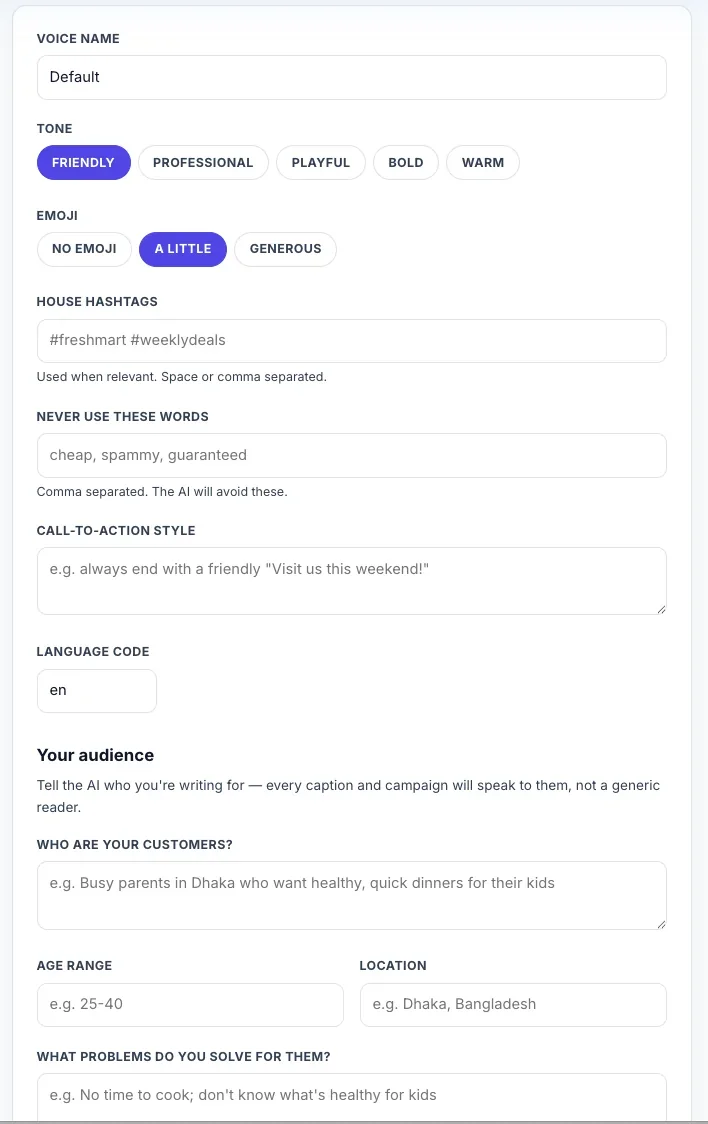
The Brand voice settings
Your Content Strategy — Pillars, Goals, and Guardrails
Posting regularly is half the job. Posting the right things is the other half — and that is what the Content Strategy does. It turns "we should post more" into a plan you can see, follow, and review, without ever looking like an agency did your marketing.
Content pillars — the things you post about. Instead of posting by mood, you define your own pillars: your specials, your behind-the-scenes, your helpful tips, your community notices, your offers. Each pillar has a colour, so your calendar reads at a glance — two specials posts in a row stand out immediately. Every post can be tagged to a pillar, and Belbotika even suggests which pillar a post belongs to; you just confirm. Over time, the pages colour itself and you can see exactly what kind of content you actually put out.
More than one strategy. You are not locked into a single plan. Keep a "Regular Mix" strategy for normal weeks and a "Holiday Push" for Ramadan, Christmas, or a sale month — each with its own pillars, its own pace, and its own settings — and switch between them whenever the season changes.
Your cadence, your commitment. Tell Belbotika how many posts a week you aim for. It tracks that promise and shows you when you are falling behind, instead of letting silence stretch into weeks. Consistency beats volume — the tool is built around your own number.
The 80/20 guardrail. Nobody wants a Page that is nothing but ads. Belbotika remembers the mix you choose — by default, no more than 20% sales posts — and gently warns you at the moment you schedule a week that would overdo it. A nudge, never a block. You stay in control.
Goals you can watch move. Set a target — reach, engagement, clicks, or new followers — for a week, a campaign, or a whole quarter. Belbotika tracks progress live from your real results and tells you when you're on track, behind, or at risk. And because it knows who your customers are — their problems, ages, and where they live — every idea it generates is aimed at them, not at a generic audience.
The days that matter, handled. Holidays and events are marked on the calendar, from national days to your own promotions and anniversaries — even a repeating weekly theme. One click on any date starts a post for it, so the days you should never miss are the days you never miss.
A monthly review that closes the loop. Once a month, Belbotika reads your real numbers and writes it in plain words: which pillar worked, which format, how your posting pace compared to your goal, and your top three posts. One click moves the winners into the Evergreen pool so they keep working — and the next month starts from what you just learned.

The content strategy settings
The Pre-Publish Coach — a Score Before You Post
Before any post goes live, Belbotika runs a coach check and gives it a score out of 100, with a band: needs work, good, or strong. It is cheap and fast, running as you type. Depending on what you are posting, the coach looks at:
- Caption limits and structure — right length for the platform, no all-caps shouting, working link handling.
- A call to action — does the post actually ask someone to do something?
- Invites a response — does it ask a question that earns comments?
- Sales content mix — is this your third sales post in a row? The coach warns you before the week gets too pushy.
- Posting time — is the slot a time your audience actually reads?
- An optional AI score — when you ask for it, Belbotika adds its own 0–100 judgement on your hook, clarity, and voice match, blended with the check score.
Nothing is ever blocked. The coach advises; you decide. But you stop learning about last month’s mistakes in next month’s analytics, and start catching them in the two seconds before you press Publish.
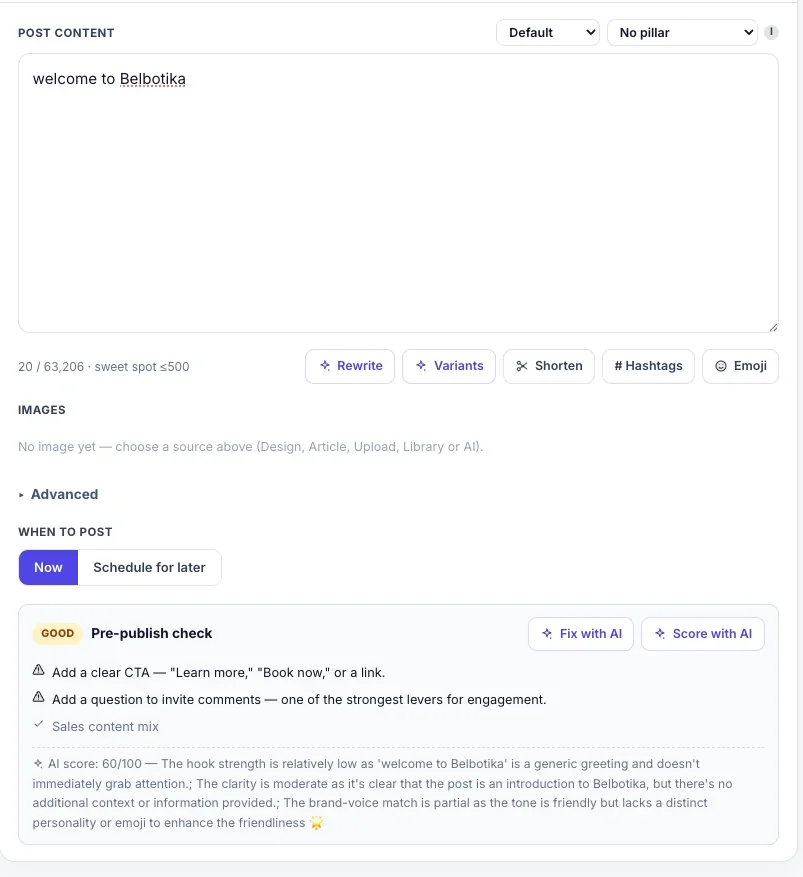
The pre-publish coach panel with a post score
Caption Tools and the “Fix With AI” Button
Stuck on a caption? The Studio gives you instant tools:
- Rewrite — make your draft more engaging and natural, without losing your meaning.
- Shorten — cut a long caption down to the essentials.
- Hashtags — add 3–5 relevant, specific hashtags.
- Emoji — add a few tasteful ones.
- Variants — get three different angles on the same post, each scored 0–100, so you can pick the strongest.
- Fix with AI — the Studio checks your post first, and when it flags a problem, one button tells Belbotika to rewrite the caption fixing exactly those issues and tells you which problems it fixed.
All of this stays inside your chosen brand voice. The technology is invisible — you just get better captions.

Caption tools and Fix with AI in action
Ideas for the Week — The Content Campaign
The blank page is the real enemy. The Planner gives you a week of post ideas built around things that matter to your business, and the Content Plan organises everything into a strategy you control:
- Goals. Set a target — more reach, engagement, clicks, or followers — for a date range, and the Planner’s ideas line up with it. Progress is tracked live from your real results.
- Categories. Create your own post categories — your specials, your behind-the-scenes, your notices, your offers — each with a colour, so your calendar reads at a glance. Let Belbotika suggest a category for a post and confirm it in one click.
- Cadence. Tell Belbotika how many posts a week you aim for. It tracks your commitment and shows you when you are falling behind — consistency beats volume.
- The 80/20 guardrail. Sales posts are capped at a percentage you choose (default 20%), with a gentle warning when a week would overdo it. Never a hard block — you stay in control.
- A CTA library. Save the call-to-action lines you use — “Inbox us,” “Order on WhatsApp,” “Visit our website” — and reuse them across posts, with one set as your default so Belbotika ends your captions with it automatically.
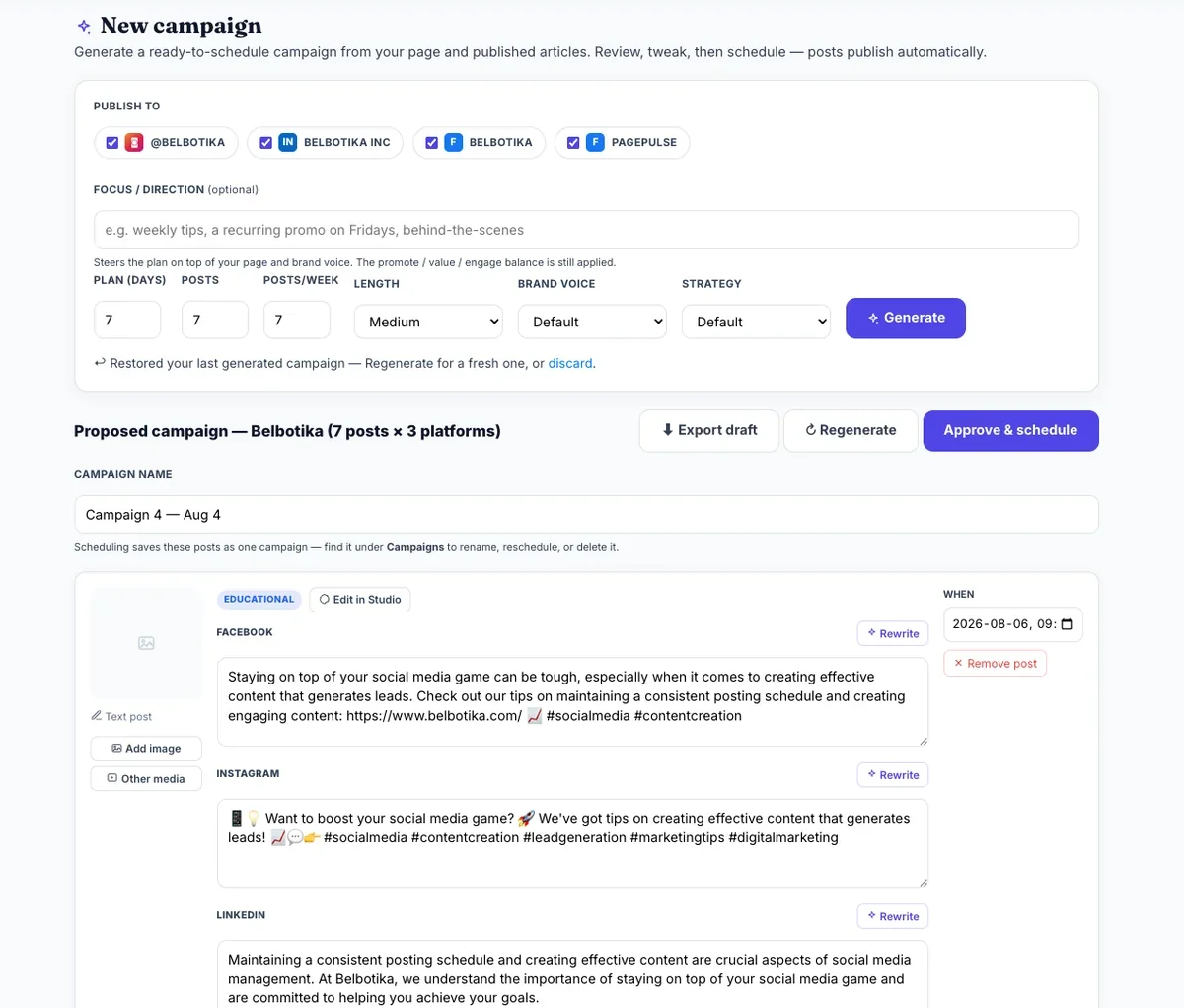
The Planner / Content plan with goals and categories
The Calendar — the Whole Week in One Sitting
The calendar view shows every scheduled post, colour-coded by category, with holidays and events marked so you never miss a big day. One click on any date starts a post for it. Your scheduled posts can be moved, rescheduled, or cancelled at any time. This is where a business owner does the whole week in twenty minutes — then walks away.
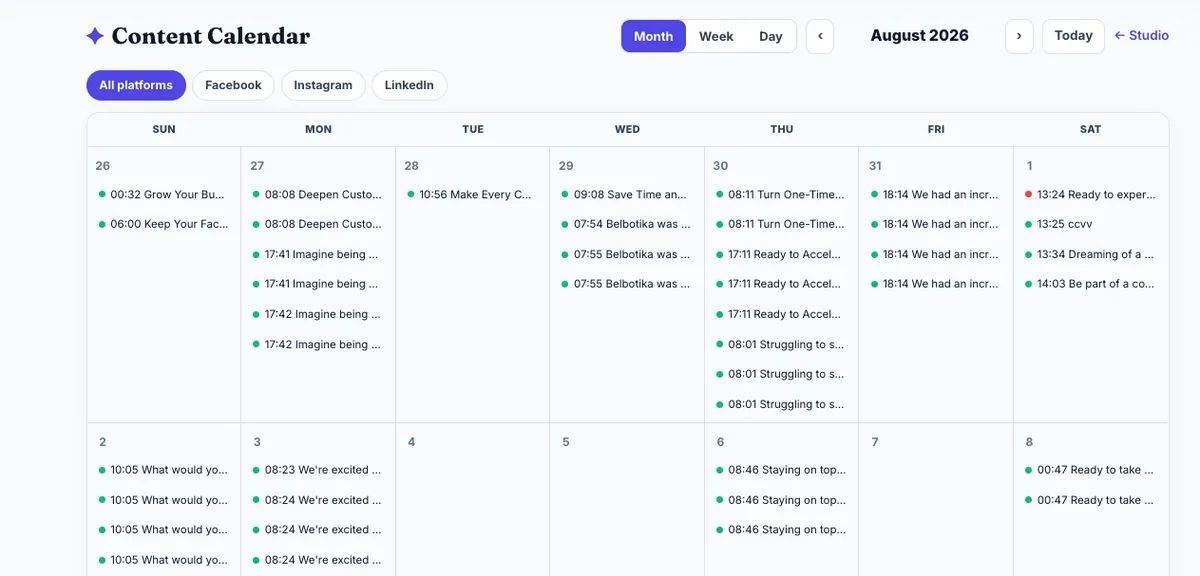
The social calendar with scheduled posts and event markers
Approvals — Nothing Goes Up Until You Approve
Belbotika does not publish anything by itself. If your workspace requires approval — and it is a one-click setting — a post written by anyone on your team waits as pending approval, and only you, or the person you trust, presses Approve. If something is not right, reject it with a note and it goes back for fixing, keeping its schedule. You are always the last person in the room before anything is made public.
Evergreen — Posts That Never Get Old
Your best posts should not die after one day. Evergreen keeps a pool of your best-performing posts and brings them back on a schedule — daily or weekly, on a day and time you choose, never repeating one too soon. Belbotika can even refresh a caption when it recycles, so returning posts feel new. Today’s winner becomes next month’s quiet-repeat customer pull.
Publish and Fan Out
When you hit Publish, Belbotika sends the post to each selected account one at a time, with careful handling built in:
- Feed posts, Photo Stories, and Reels are all supported from the same composer — the right surface for the job, from 24-hour stories to reach-hungry Reels.
- One creation, many posts. A campaign you build once can fan out into many scheduled posts, grouped, tracked, and reviewed as one item.
- Reliability. Accounts are health-checked daily, tokens are refreshed before they expire, and a post that fails can be retried with one click instead of investigating manually.
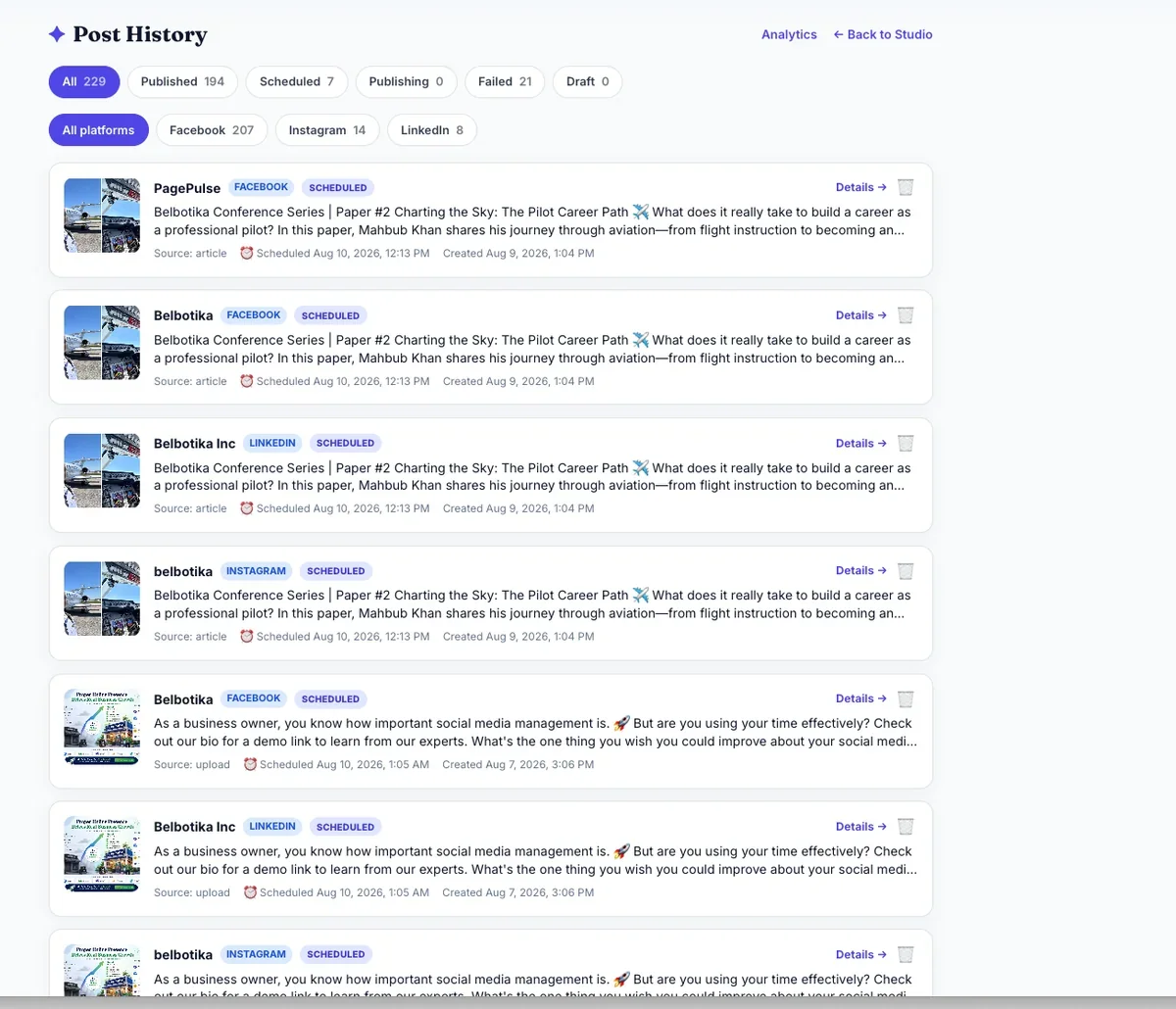
Publishing and the post queue / history
Analytics and the Monthly Review
Numbers after posting, not guesses before. Each post shows real results — likes, comments, shares, reach, and clicks — pulled straight from your connected Page. The analytics page compares your posts and surfaces the patterns: which category works, which format, which time.
Once a month, Belbotika writes a short plain-language review: which kind of post did best, how often you posted versus your goal, and your top three posts. One click moves your best posts into the Evergreen pool, so the next month starts stronger.
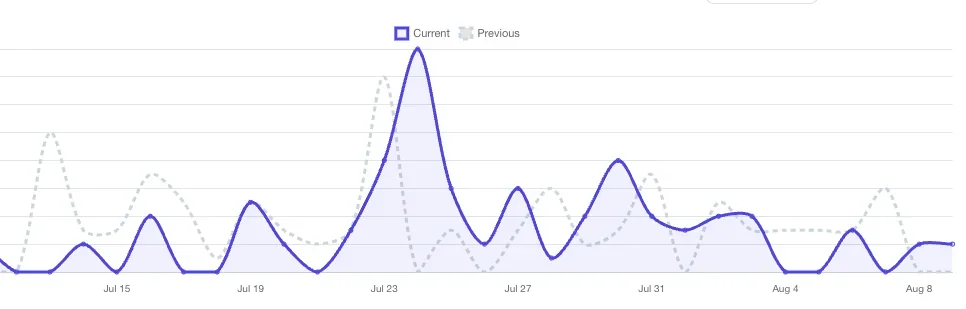
The Analytics dashboard and Monthly Review
How Real Businesses Use Belbotika Social
Grocery store, weekly flyer, a week of posts. The owner designs the weekly flyer in Belbotika Email on Sunday night. Monday morning, one click turns it into a week of Facebook posts — Monday’s specials, Wednesday’s reminder, Friday’s last call. Same flyer, five chances to be seen.
Bakery, twenty minutes on a Tuesday. The owner connects the Page once, then each Tuesday spends one sitting writing and approving the week — announcements, photos, a weekend offer. Cadence says five posts; Belbotika schedules them; nobody touches a phone all week.
Realtor turning a listing into posts. A new listing becomes a short article, and the article becomes several posts at different angles, all carrying the listing’s link with tracking tags. The agent sees exactly which post drove the viewings.
Agency running several client Pages. One Belbotika workspace, several connected Pages, several brand voices. Each client’s posts sound like them, get approved by them, and go up on their schedule — from one login.
Dental clinic keeping the practice present. A clinic posts appointment-reminder content and tips on a reliable cadence, scheduled by the receptionist in one sitting a month ahead, with the practice’s voice and hashtags applied automatically.
How Belbotika Social Compares
- vs Meta Business Suite. Facebook’s free tool can schedule, but it never tells you what to post, never writes in your voice, never scores a post before it goes out, and never plans a month. Belbotika Social covers the whole job, not just the sending.
- vs Hootsuite and Buffer. They are built for social-media managers and bill per Page and per seat. They send whatever you give them. Belbotika Social is built for the business owner with no marketing team — it supplies the writing, the checks, the plans, and the reviews, not just the queue.
What Belbotika Social Knows About Your Customers
The whole point of the Platform is that it gets to know your business over time. Your chosen voice, your categories, your audience, your best times, and your best posts become the raw material for everything it generates. The more you use it, the more it sounds like you and the less there is to do.
Frequently Asked Questions
Do I need a marketing team to use Belbotika Social? No. It is built for one person with no help. Connect the Page, write your week in one sitting, approve, done.
Does Belbotika post without asking me? Never. If you use approvals, nothing goes up until you press Approve. You are always the last person in the room.
Which Pages can I connect? Your own Facebook Pages. You can connect more than one, and manage agencies and multiple outlets from one workspace. Instagram and LinkedIn are part of the same publishing pipeline and come online as their connections are approved.
Can I post photos, videos, carousels, and Reels? Yes. Feed posts, photo posts, carousels, video posts and Reels are all composed and published from the Studio, with Story posts for 24-hour content.
What about scheduling in my timezone? Belbotika recommends good posting times from your own engagement data, and every post is scheduled at whatever date and time you choose.
Is Belbotika Social free to start? Yes. No credit card is required. Monthly plans are available with cancel-anytime terms.
Get Started
Website: belbotika.com Contact: info@belbotika.com
Belbotika Social is free to start. No credit card. Setup in 2 minutes.
Sit down once. Write your week in your own words. Approve. Your Pages keep posting while you get on with the real work.
Comments 0
No comments yet. Be the first to comment!
Sign in to leave a comment.